Import a file
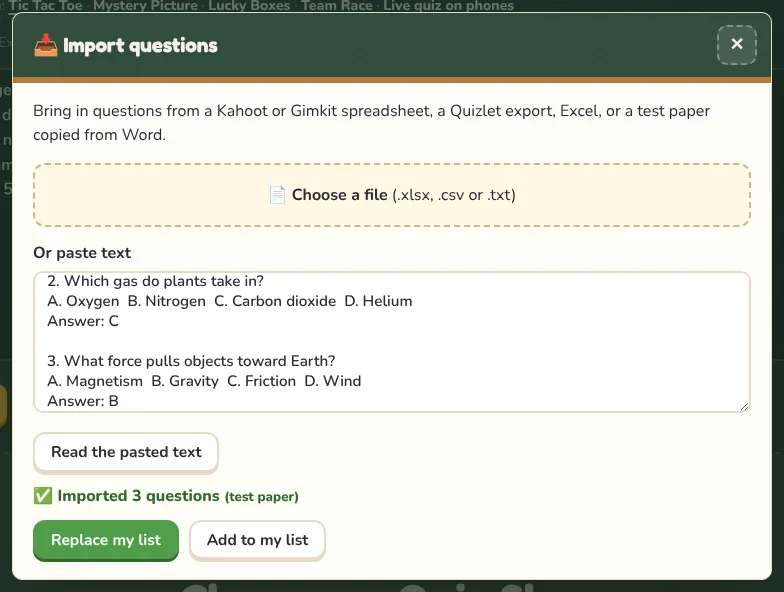
- Open a game and press ✏️ Edit questions, then 📥 Import.
- Press Choose a file and pick an .xlsx, .csv or .txt file.
- Check the preview. It shows how many questions were found and lists any rows that were skipped and why.
- Press Replace my list or Add to my list.
What can be imported
- Kahoot spreadsheets (the Kahoot quiz template, with the correct answer number in its own column).
- Gimkit spreadsheets (question, correct answer, incorrect answers).
- Quizlet exports: in Quizlet choose Export, then paste the text. Each line becomes a term and its meaning.
- Excel and CSV files with one question per row.
- Tests from Word or Google Docs: numbered questions with A–D choices and an “Answer: B” line, pasted as text.
Paste instead of uploading
Under Or paste text you can paste a test or a word list directly and press Read the pasted text. This is the quickest way to bring in a test from a Word document.
TipOld .xls files can’t be read. In Excel, choose Save As and pick .xlsx or .csv first. Old .doc files can’t be read either: copy the text and paste it.
Export your list
The ⬇ CSV button downloads your current list as a spreadsheet, so you can keep a copy, edit it in Excel or import it into another game later.